Skip to content
Twilio Icon
Tool

Twilio Voice: Build Your Own Phone and WhatsApp Stack.

Twilio isn't a phone system, it's a toolkit. You get numbers, calls and WhatsApp via API and build exactly the tool your team needs. You only pay for what you use.

What is Twilio Voice?

Telephony as an API, not a contract.

Twilio Voice is Twilio's telephony interface. You make and receive calls on regular phone numbers, controlled through an API.

The principle: on every call, Twilio sends a webhook to your own small backend and asks what should happen. The backend responds with TwiML, Twilio's own XML format. It tells the call what to do: forward, go to voicemail, record or answer automatically. Announcements use text-to-speech, with neural voices (opens in new tab) if you like, which sound remarkably human.

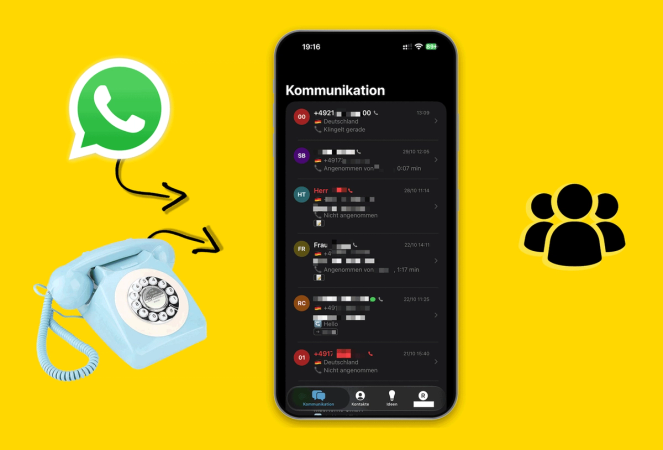
The catch: out of the box, Twilio doesn't come with a phone. No ready-made client, no app to install. Instead there are SDKs for JavaScript, iOS, Android and React Native (opens in new tab). With them, you build your own communication tool quickly, in the browser or as an app. And because WhatsApp runs on the same Twilio platform, calls and chats end up in the same tool.

0base fee. You only pay for what you actually use.
$1.35per month for a German landline number.
4 SDKsJavaScript, iOS, Android and React Native for your own client.
What can Twilio Voice do?

Three things Twilio Voice is particularly strong at.

Twilio Voice is a toolkit. Here are the three areas where it makes the biggest difference.

Automate with webhooks and TwiML

Your backend decides on every call: check office hours, look up the caller in the CRM, play an announcement, route to voicemail or put the call through to the right person. Inbound and outbound.

The result: A full telephony stack in the background, driven by your rules instead of a phone system's menu.

One client for desktop and mobile

Twilio doesn't ship a phone, it ships SDKs. We use them to build combined apps for clients that run on desktop and mobile. Calls and WhatsApp in one app, right next to the CRM if you want.

The result: No desk phone, no second app, one tool for everything.

WhatsApp on the same platform

WhatsApp messages and even WhatsApp calls run through Twilio. A customer writes, calls, writes again: it all ends up in one thread.

The result: One tool for phone and WhatsApp instead of two silos.

Twilio costs

What does Twilio Voice cost?

Twilio bills entirely by volume. There's no base fee and no per-user licence. The only fixed cost is the phone number. Billing is in US dollars.

Phone number: A German landline number costs $1.35 per month, a mobile number $30.

Calls: Inbound calls cost $0.01 per minute. Outbound to German landlines it's $0.0283, to mobile networks $0.042 per minute. If the call runs through a browser or app, add $0.004 per minute.

WhatsApp: $0.005 Twilio fee per message, plus Meta's fee depending on the message type.

As of October 2026, according to Twilio's pricing page (opens in new tab). If you call a lot, you pay more. If you call little, you pay almost nothing. That's why we recommend Twilio to small businesses too: set it up properly once, and you only pay for what you actually use.

Setting up Twilio Voice

What you need before the first call runs.

At the start, you set up a few things once so you have a proper client. After that, the stack just runs.

Phone number with proof of address: For German numbers, Twilio requires address verification. That takes a few days, so apply early.

A small backend: On every call, Twilio asks via webhook what should happen. That can be a small server, a serverless function or an n8n workflow.

A client: Browser, app, or for a start simply forwarding to your mobile.

WhatsApp number: The toughest part is rarely the tech. For us, it was getting the WhatsApp number approved in Meta Business Manager. Plan time for it.

Existing number: Your old number can keep running in parallel and forward to Twilio. You can still port it later.


From practice

Phone and WhatsApp in one app.

For clients, we build combined desktop and mobile apps on Twilio. One tool where calls and WhatsApp come together, instead of a desk phone, a softphone and WhatsApp on the work phone.

In the background, a small backend controls every call via webhook and TwiML. The team sets the rules, not the phone system.

  • One app for desktop and mobile
  • Calls and WhatsApp in one thread
  • Announcements via text-to-speech with neural voices
  • Office hours, voicemail and forwarding automated
  • No base fee, costs only by usage
  • Old phone number keeps running in parallel

Build telephony that fits your process.

If you want phone and WhatsApp in one tool, without a phone system and without a base fee: tell us what you need.

Related Service

API Interfaces: Connect Your Systems

View Service

Related Challenges

Built with Twilio Voice: Build Your Own Phone Stack

Diagram of WhatsApp and voice via Twilio in an iOS app
Customer project

WhatsApp and Calls in One iOS App

An iOS app for WhatsApp and phone calls in a team: Twilio, FastAPI and Supabase, with CallKit, ring groups and a busy status. This is how we built it.

  • Twilio IconTwilio Voice: Build Your Own Phone Stack
  • Supabase IconWhat Is Supabase? Database, Login, Pricing
Learn more