
Headless CMS: What It Is, What It Costs, When It Fits
A headless CMS separates content from presentation. You manage text, images and pages in one place, and an interface (API) delivers them to your website, app or any other channel. That makes websites faster and more secure, but takes more work to set up. Whether it pays off depends less on the technology than on your team and your plans.
As of October 2026.
Why is it called headless?
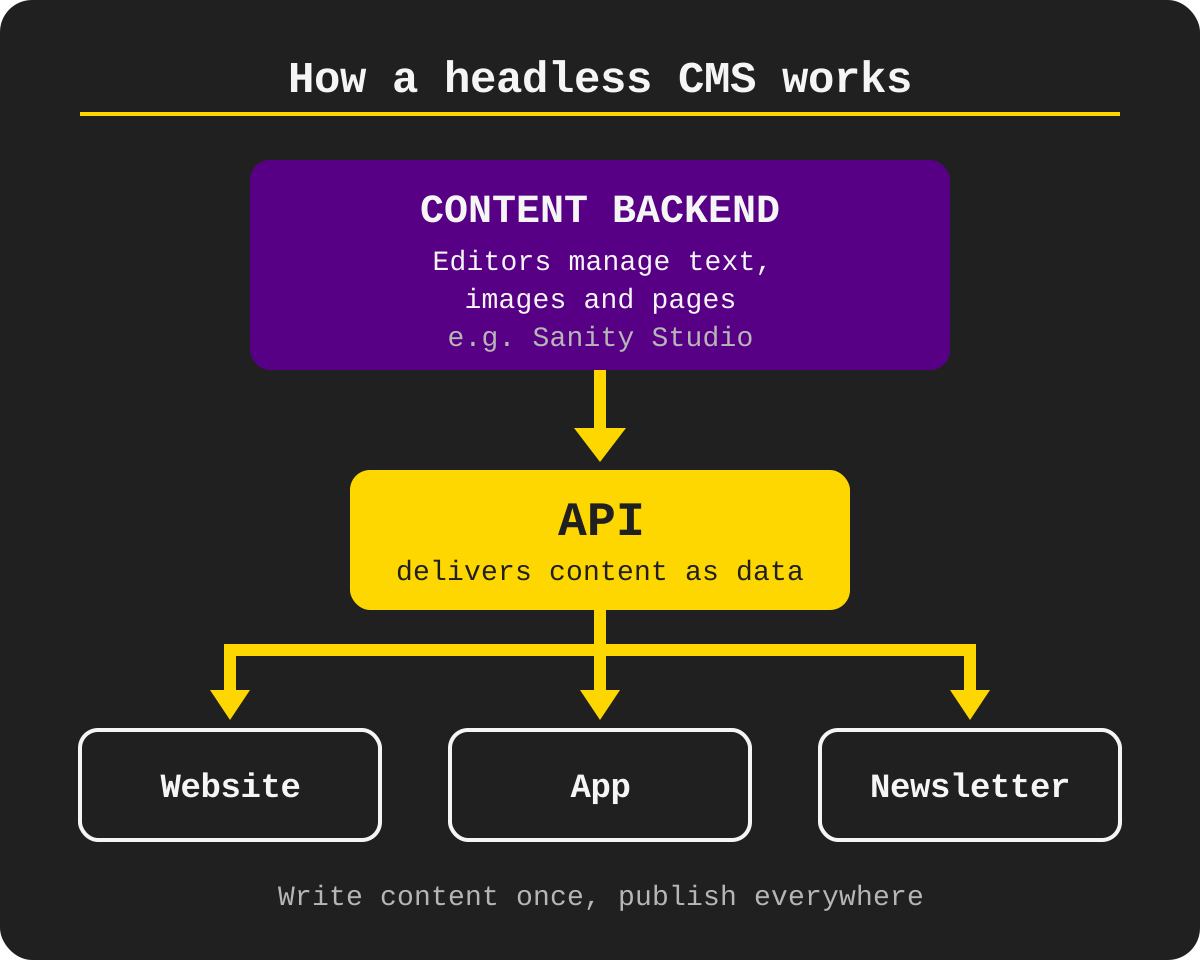
In a classic CMS like WordPress, body and head are joined. The system stores the content and also builds the finished page from it. The head is the presentation. A headless CMS has no head: it only stores and manages content. How it looks is decided by a separate frontend that fetches the content via the API.
Content backend: This is where your editors manage text, images and pages, for example in Sanity Studio.
API: It delivers content as data, not as a finished page.
Frontend: It builds the website from that data, for example with Next.js. Pages are often pre-built and served from a CDN.
This website runs exactly like that: content in Sanity, frontend with Next.js, served by Vercel.
Classic, decoupled, headless, hybrid: the difference
Classic
One system for content and presentation, for example WordPress or TYPO3.
Fits: standard websites and teams without developers.
Decoupled
The CMS stays, the website is built separately, for example WordPress with its own frontend.
Fits: teams that keep their CMS and want a modern frontend.
Headless
Only content and API, presentation is fully separate, for example Sanity, Contentful, Storyblok, Strapi or Directus.
Fits: multiple channels and high demands on speed and design.
Hybrid
Headless with a visual editor or live preview, for example Storyblok or Sanity with Presentation.
Fits: editors who want headless but need to see what they build.
What a headless CMS does better
Speed
Pages are pre-built and served from a CDN. A blog post on this website scores 97 out of 100 on mobile in PageSpeed Insights (measured on 26 October 2026).
Security
The website has no login page and no plugins in the frontend. That shrinks the attack surface.
One source, many channels
Website, app, newsletter or info screen pull from the same source.
Design freedom
The frontend is not tied to a CMS theme.
Less update stress
No plugin zoo that breaks with every update.
What you need to know
Nothing works without development. A developer builds the frontend. Install a theme and go does not exist here.
More planning up front. Which fields does a blog post, a service, a case study have? You plan that before the first piece of content.
Preview takes effort. For editors to see how a page looks, the preview has to be set up.
No plugin for everything. Contact form, search or newsletter come as your own code or an external service.
A change for your editors. Anyone who worked in WordPress for years needs time to get used to it.
“A headless CMS is not an upgrade every website needs. It pays off when speed, multiple channels or an old CMS hold you back. For a small five-page website, WordPress is perfectly fine.”
What a headless CMS is good for
A headless CMS plays to its strengths when content is needed in more than one place or the website has to be fast. Typical cases:
- Website and app with the same content
- Multilingual websites, several languages from one system
- Websites where load time and Google rankings matter
- Replacing an old CMS that nobody wants to maintain anymore
- Content for shop, dealer portal or info screens
What does a headless CMS cost?
The licence is rarely the problem. Almost every vendor has a free tier. Implementation and maintenance are where it gets expensive.
Sanity: free up to 20 users and 10,000 documents, paid from 15 US dollars per user per month (pricing (opens in new tab)).
Contentful: free with 10 users and 100,000 API calls per month, paid from 300 US dollars per month (pricing (opens in new tab)).
Storyblok: free with 1 user, paid from 99 US dollars per month (pricing (opens in new tab)).
Strapi: open source (MIT) when self-hosted, Strapi Cloud from 35 US dollars per month (pricing (opens in new tab)).
Directus: free to self-host for companies under 5 million US dollars revenue and fewer than 50 employees, cloud from 99 US dollars per month (pricing (opens in new tab)).
Prices as of 27 October 2026, excluding tax. Check the current pricing page before you decide.
On top come hosting for the frontend, for example Vercel or your own server, implementation and ongoing maintenance. In most projects those are the biggest items, not the licence.
When a headless CMS is not the right fit
- You only need a simple website. For a few pages WordPress or a site builder is enough.
- Nobody around you develops. Then every layout change becomes a job for someone else.
- Your editors want to build everything by drag and drop. With headless that takes extra work.
- The budget only covers the launch. Without maintenance even the fastest website gets outdated.
And when it fits: when your website has to be fast, serves several channels, is multilingual or your old CMS eats more time than it saves.
Where is the data stored?
For companies in the EU this is often the deciding question: is the content stored in the EU, and is there a data processing agreement (DPA)?
Sanity: Content on Google Cloud in Belgium (region europe-west1, St. Ghislain), backups in several EU regions. Sanity's own user management is partly in the US. Data Processing Addendum available online (source (opens in new tab)).
Contentful: US by default. EU storage (Ireland, backup Frankfurt) only as an add-on on the Premium plan (source (opens in new tab)).
Storyblok: Region chosen when you create a space: Europe, US, Canada, Australia. EU hosting on AWS in Frankfurt, DPA downloadable in your profile (source (opens in new tab)).
Strapi: self-hosted wherever your server is. Strapi Cloud: region chosen at creation, including Europe West (source (opens in new tab)).
Directus: self-hosted wherever your server is.
Important: with every vendor a CDN delivers the content worldwide. Data location describes where content is stored, not where it is delivered.
Other selection criteria: can your editors work with it, and is there a preview? How are languages handled? How good is image management? What does it cost with more users and requests? And can you get your content out again?
Popular headless CMS at a glance
Sanity
Flexible content model, Studio customisable in your own code, real-time collaboration. For teams with developers who want to customise a lot.
We build with Sanity because the Studio adapts to every project in code and the free tier is enough for many smaller websites.
Contentful
Established in large enterprises. For big organisations with budget.
Storyblok
Visual editor, selectable region. For editors who want to see what they build.
Strapi
Open source, self-hostable. For teams that want to control server and data themselves.
Directus
Open source, sits on top of an existing SQL database. For projects with an existing database.
From WordPress or TYPO3 to a headless CMS
What switching from WordPress looks like in practice is in our post on the WordPress alternative. We will soon show a TYPO3 replacement on a real project.
- Inventory: list pages, content types and media, drop what you do not need
- Plan the content model before migrating
- Migrate content by script, not by copy and paste
- Build the frontend
- Redirect every old URL to the new one, or rankings get lost
- After launch, check indexing and errors in Search Console
Frequently asked questions
Not out of the box. WordPress is a classic CMS. Through its REST API it can run headless, then you build the frontend separately.
Sanity, Contentful, Storyblok and Strapi all have a free tier (as of 27 October 2026). The big items are implementation, frontend hosting and maintenance.
That depends on the vendor and plan. Check where content is stored and whether there is a data processing agreement. With self-hosted systems like Strapi or Directus you choose the location yourself.
Yes, for the frontend. Managing content afterwards works without a developer.
Is switching worth it for your website?
Tell us briefly what is slowing your website down today. We will tell you honestly whether a headless CMS is the answer or whether your current system is enough.